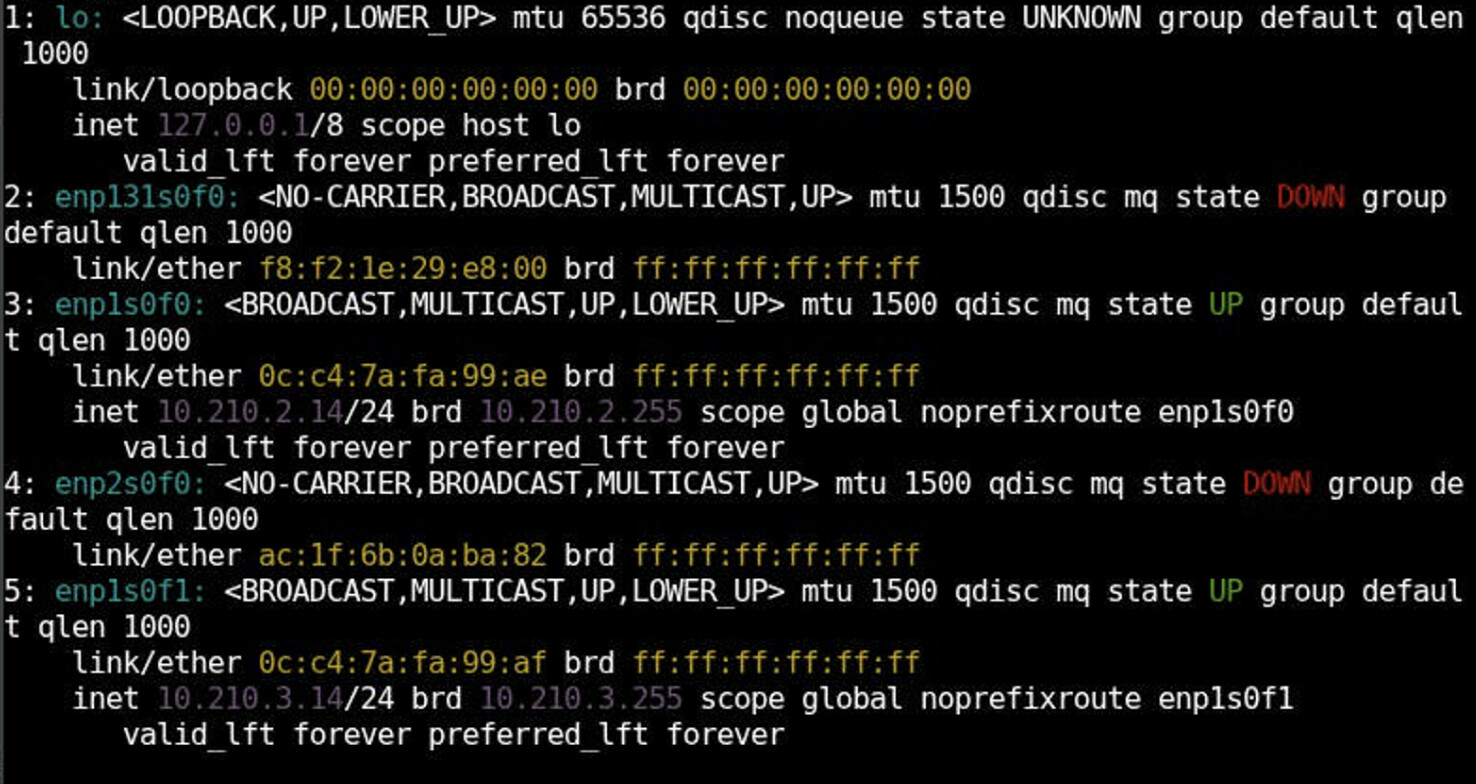
I have a weird issue where I can’t reach the gateway or ping outside of the local server.
The issue started after I tried some Podman bridge thing where the network interfaces disappeared and I had to re-add them. In the same network and with very similar servers and network setup also running 9.6 I have no issues. The servers are all going through the same NAT-server.
This did work but I can’t for the love of some higher being understand why this doesn’t work. Maybe something configured with Cockpit and the Podman network test broke some configuration somehow.
I have tried to reset everything, including Podman which is not running now, removed all configs and re-done them (only 2 interfaces actually connected, except ILO/iDRAC) etc but still the issue remains. Of course tried using nmtui and also nmcli as well as the Cockpit UI interface.
Could the MAC addresses have been swapped somehow or lost in the sense that the ethernet interface is not “connected” to the correct physical interface which makes the system not knowing which interface to use to reach the gateway (NAT server) and Internet?
Have not had the same issue on the other servers, but have not on the other hand tried Podman and using a bridge connection which most likely was wrong configured in some way.
Any ideas of what could have happened when I did the Podman bridge config? Could such a config really create this type of problem messing up MAC addresses and/or similar?
What can one do to reset all network related config and things, even in maybe less obvious places where I’ve already tried…? 
First step is to know what was there. In that sense DHCP is awesome.
It helps to think that computer does not have network – network has computers.
If the network has DHCP server, then the minimal (default) config can fetch
current network configuration from the server without any hardcoded config in
our machine.
An additional thing when being member of more than one network:
there is usually only one “default gateway”. (Having that wrong does affect outreach.)
Ideally, one can remove all network config (e.g. with nmcli) and then create from scratch.
However, if you cannot access the machine without functional interface, then that is an issue.
Can you access the console with ILO/iDRAC? If yes, then you are “free to play”.
Hi! We have tried removing all connections and re-adding them. No DHCP available in this network unfortunately. Only manual set IP:s. Default gateway is only one as well, at least configured, so that we have double checked. Starting to suspect some issue with the interface itself since sometimes it shows connection speed of 100 mbps where I know it is 1 gbps. Maybe that gives a clue of what might be the culprit… 
My first thought is that you should show us the output from “ip route”.
I don’t think there is enough information. I see two addresses in your print-screen: 10.210.2.14/24 and 10.210.3.14/24, BUT what is the address of your gateway you are trying to reach?
Tony
Hi Tony,
Here’s the ip route information So a fairly basic setup where we have two networks where only the 10.210.2.0/24 is used for basic internet networking and the other one is used for other type of traffic.
Reach how?
ping 10.210.2.4
ssh 10.210.2.4
something else
Does the (firewall of) 10.210.2.4 allow (any) traffic from 10.210.2.14?
Ping or anything… Firewall turned off… Starting to believe there’s an issue with the interface itself or possibly the cable.
To get a sense of what the interface “sees”, curious what “ip neigh show” outputs, i.e. the ARP (neighbor) table, looking especially for the gateway at 10.210.2.4
The ‘ip’ can show statistics too:
ip -s link
How about everyone else in the 10.210.2.0/24? Can they see each other?
What happens, when 10.210.2.4 pings 10.210.2.14?
if there were tools like nmap or tcpdump installed, then probing/listening of traffic would be possible.
Hi! yes, everyone else can indeed “see” each other. So issue seems to only be in this particular server. Pinging from the gateway/NAT server it don’t get a response back.
Adding some ip -s link results for the 2 interfaces in use.
nmap is installed in case there are some useful commands I can try
Both interfaces have dropped some packets that they tried to send. The enp1s0f0 has errors on receive too. Overall, not much.
Overall, there has been much more traffic on the enp1s0f1.
nmap -sP 10.210.2.0/24
would ping each IP address on that range and list machines that do reply. E.g.:
# nmap -sP 10.0.5.0/24
Starting Nmap 7.92 ( https://nmap.org ) at 2025-10-30 12:21 EET
Nmap scan report for a.dummy (10.0.5.1)
Host is up (0.00029s latency).
MAC Address: 20:CF:30:*:*:* (Asustek Computer)
Nmap scan report for b.dummy (10.0.5.6)
Host is up (0.00021s latency).
MAC Address: B0:26:28:*:*:* (Broadcom Limited)
...
Just to clarify, this Rocky machine sees nobody (in 10.210.2.0/24) and nobody sees this machine?
You have unused interfaces. What if you switch the wire to them? (This would answer the: “is it a bad physical port?”)
Tested the nmap and the result is that it finds only itself  So sort of what we’ve seen… and the server can’t be seen either from the other systems. Will plan to go to the server next week and test replacing cables and see what happens.
Following up on my early comment, something you can do remotely (before visiting the server):
To get a sense of what the interface “sees”, curious what “ip neigh show” outputs, i.e. the ARP (neighbor) table, looking especially for the gateway at 10.210.2.4
The thing about “ip neigh show” is that the last column (field) is named “state” and is more fully defined as “reachability state”, which speaks to reachability and validity.
Tony
Hi all,
After some long investigation and troubleshooting the issue turned out to be an issue in the switch, which I also suspected, which for some reason had a port that was configured to be in “trunk” mode. So this caused the connection to behave strange and also give some weird behavior with the speed going from 100 mbps to 1 gbps and wise versatility quite randomly.
Thanks for all suggestions and help!