Is there something we need to do to allow Wireguard client configs? I import a Wireguard config (that works elsewhere like on the Wireguard client on Android), activate that Wireguard connection and all internet traffic stops. This includes when firewalld is stopped, and has been tested on the Workstation Lite Live 10 and a Workstation installed from Rocky-10.0-x86_64-boot.iso.
How are you configuring the client? Are you going through Network Manager? Can you walk through the steps you’re taking on the client? This way I can try to reproduce your issue.
Importing the client.conf provided by a ASUSWRT router using NetworkManager.
[Interface]
PrivateKey = <keyvalue>
Address = 10.6.0.2/32,fd28:0017:e90b:111::2/128
DNS = 10.6.0.1

[Peer]
PublicKey = <keyvalue>
AllowedIPs = 0.0.0.0/0,::/0
Endpoint = <endpointipandport>
PersistentKeepalive = 25
Not my screenshot but this shows where.
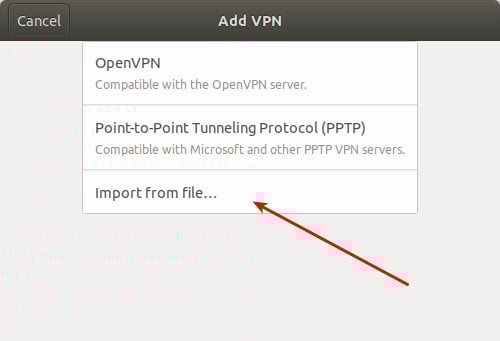
The same config.conf works perfectly in Wireguard for Android and importing in the same way in Fedora 40/42.
This Wireguard issue appears to be from upstream, as it is present in CentOS Stream 10 and Almalinux 10 as well as Rocky Linux 10.
Confirmed with RHEL-84185. Installing mptcpd and configuring mptcpd fixes the problem.